SCHMS BY ASTRAL TECHNOLOGIES

School operations,
brought together.

Run student records, academics, attendance, results, finance and school access through one connected operating system.

SCHMS gives school owners, leaders, administrators, teachers, finance teams, parents and students the right view of school operations without depending on scattered records and disconnected workflows.

Role- and assignment-scoped access · Responsive · Installable PWA

THE OPERATIONAL PROBLEM

Running a school shouldn't depend on scattered records.

Critical school workflows often cross different people, records and responsibilities. SCHMS is designed to bring those operations into one connected system so information can move with the student, the academic process and the people responsible for follow-up.

Many responsibilitiesStudent recordsAcademic processFollow-up ownership
Connected workspaceSCHMSAccess shaped by role and responsibility

ONE CONNECTED SCHOOL WORKSPACE

The work is connected.
The software should be too.

SCHMS brings core records and workflows into a shared system while keeping access appropriate to each user's role and responsibilities.

01

School foundations

  • School setup
  • Admissions & student records
02

Daily operations

  • Academics
  • Attendance
  • Student support
03

Controlled outcomes

  • Results & report cards
  • Review, approval & publication
04

School-wide visibility

  • Finance
  • Reports & exports
  • Notifications & workflows
05

Connected access

  • Parent access
  • Student access
  • Installable responsive PWA
SCHMS Leadership Workspace showing attendance, student-support and communication action summaries.
Leadership Workspace · A shared view of school follow-up · Fictional demonstration data

VISIBILITY THAT LEADS TO ACTION

See who needs attention — and what happens next.

SCHMS helps school leadership and authorized staff move from scattered observations to clearer student context, follow-up ownership and outstanding actions.

  • Leadership attention queue
  • Student360 comprehensive student visibility
  • Attendance context
  • Intervention and follow-up ownership
SCHMS Student360 showing a fictional student's identity, class and attendance summary.
Student360 · Attendance in the context of a student record · Fictional demonstration data

THE RIGHT VIEW FOR EACH ROLE

One school.
Different responsibilities.

Permissions follow a person's role and assignments. Not every user sees every area.

A ROLE-AWARE WORKSPACE

Owner

Maintain school-level operational oversight and visibility, with access shaped by the responsibilities assigned to the role.

Access follows role and assignment.

BUILT AROUND REAL WORKFLOWS

From one school process to the next.

01

A student journey

  1. Admission & student record
  2. Class and academic context
  3. Ongoing school record
02

Attendance to follow-up

  1. Attendance
  2. Visibility
  3. Attention
  4. Intervention & follow-up
03

Results with review

  1. Score / result workflow
  2. Review
  3. Approval
  4. Publication & scoped access
04

Finance records

  1. Finance setup
  2. Invoicing
  3. Payment recording
  4. Receipt & reporting
SCHMS intervention queue showing fictional follow-ups with priority, owner, due date and status.
Attention & Interventions · Clear follow-up ownership · Fictional demonstration data

RESULTS & REPORT CARDS

From result preparation to controlled publication.

Academic result workflows support review, approval and report-card publication. Appropriate parent and student access follows publication under the school's access boundaries.

Prepare→Review→Approve→Publish
SCHMS report card showing a fictional student's performance, subject scores and grades.
Report Cards · A published student report · Fictional demonstration data

FINANCE WORKFLOWS

Know what was billed, recorded and still outstanding.

Set up finance records, create invoices, record payments, issue receipts and review finance reports. SCHMS does not represent payment-gateway processing.

Setup→Invoice→Record→Report
SCHMS finance workspace showing fictional invoices, balances and payment statuses.
Finance · Recorded invoices and outstanding balances · Fictional demonstration data

PARENT & STUDENT ACCESS

Access without losing boundaries.

Parents and guardians receive access scoped to linked children. Students receive access scoped to their own appropriate school information. Access boundaries remain part of the product, not an afterthought.
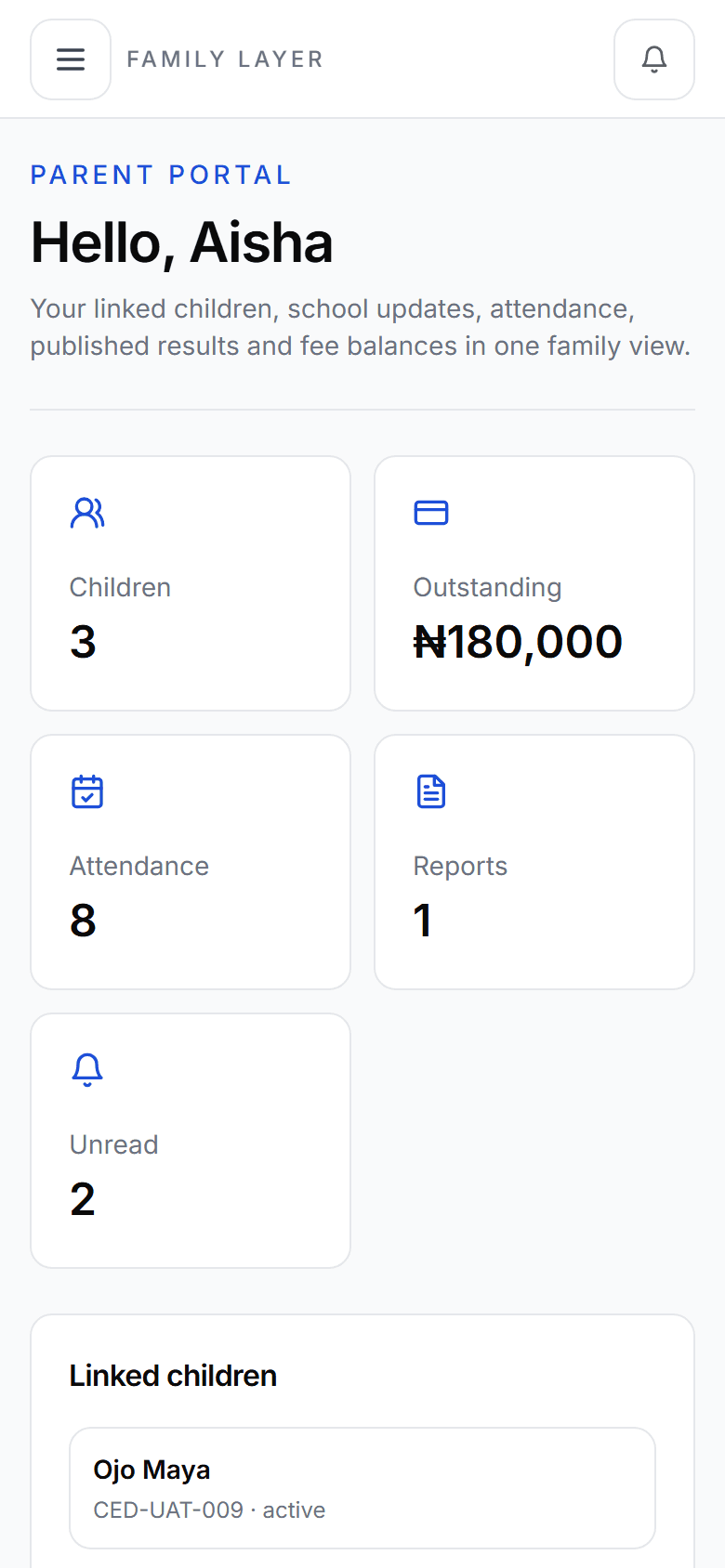
SCHMS parent workspace showing school information scoped to linked children.
Parent workspace · Access scoped to linked children · Fictional demonstration data

DESIGNED WITH CLEAR BOUNDARIES

School data should stay within the right boundaries.

SCHMS separates school workspaces and limits access according to role, assignment and relationship to the student.

  • Multi-tenant school separation
  • Role- and assignment-scoped permissions
  • Parent access limited to linked children
  • Student access appropriately scoped
  • Audit evidence for important operations
  • Protected records remain connection-required

MOBILE, TABLET & DESKTOP

Built for the devices school teams already use.

SCHMS is responsive across mobile, tablet and desktop, with installable PWA access on supported devices. Protected school records remain connection-required so sensitive records are not broadly cached offline.

SCHMS parent workspace on a mobile viewport with linked-child information and family navigation.
SCHMS on mobile · Responsive web access · Fictional demonstration data

GETTING STARTED

Set up the school before
switching on the workflow.

  1. 01Understand school structure
  2. 02Configure school and academic setup
  3. 03Set roles and responsibilities
  4. 04Prepare relevant operational setup
  5. 05Go live with agreed workflows

COMMON QUESTIONS

Clear answers
about SCHMS.

Ask about your school
What is SCHMS?

SCHMS is Astral Technologies’ multi-tenant school operating system for connected school records and workflows.

Who is SCHMS designed for?

It supports school owners, leadership, administrators, teachers, finance teams, parents and students, with access based on each role and assignment.

What parts of school operations does SCHMS cover?

Confirmed areas include school setup, admissions and student records, academics, attendance, student support, results and report cards, finance, reports and exports, notifications and parent and student access.

Can teachers, parents and students have different access?

Yes. Permissions are role- and assignment-scoped. Parent or guardian access is limited to linked children, and student access is appropriately scoped to the student.

Can parents see records for children who are not linked to them?

No. Parent and guardian access is scoped to the children linked to that account.

Does SCHMS work on phones and tablets?

SCHMS is responsive across mobile, tablet and desktop and can be installed as a progressive web app on supported devices.

Does SCHMS work offline?

SCHMS is installable as a PWA, but protected school records remain connection-required. It is not an offline school-records system.

Does SCHMS include payroll, transport, hostel or clinic management?

SCHMS currently focuses on its confirmed core school-operating workflows. Payroll, transport, hostel and clinic management are not part of the confirmed baseline scope.

How do I see SCHMS for my school?

Request a demo and tell Astral about your school and the workflows you want to discuss. Request a demo.

THE NEXT CONVERSATION

See how SCHMS
fits your school.

Tell us about your school and the workflows you want to improve. We'll use that context to make the conversation useful.